

The financial services industry runs on relationships, trust, and speed.
- A relationship manager who reaches a high-value client before a competitor does.
- An insurance assessor who gets to a claim site faster than expected.
- A wealth adviser who covers more prospects in a single day without burning out.
In each case, the competitive edge is who gets there first, plans smarter, and wastes less time on the road.
Yet most financial services organizations are still planning field operations from lists. CRM records with addresses that tell you nothing about where a client sits relative to your next meeting, which territory is underserved, or how long it actually takes to drive between your 10 AM and 11:30 AM appointments in morning traffic.
Maplytics, the certified geo-analytical app for Microsoft Dynamics 365, Power Apps, Power Pages, and Dataverse, changes that, turning your CRM data into a live geographic picture that your relationship managers, field advisers, and operations teams can act on. Here are six real use cases where Maplytics delivers measurable value in financial services.
Use Case 1- How to Visualize Client and Prospect Portfolios on a Map
The Problem: A wealth management firm has three hundred clients spread across a metropolitan region. Relationship managers know their clients individually, but have no sense of where they cluster geographically. Planning a day of visits means scrolling through a CRM list with no context for distance, proximity, or logical sequencing.
Maplytics in Action: Map CRM Data plots every client, prospect, and lead on an interactive map interface inside Dynamics 365, color-coded by relationship manager, portfolio size, client tier, or any custom field. A manager targeting ultra-high-net-worth clients in a specific district can filter the map to that segment instantly, see exactly where everyone is, and build a logical visit sequence in minutes rather than hours.
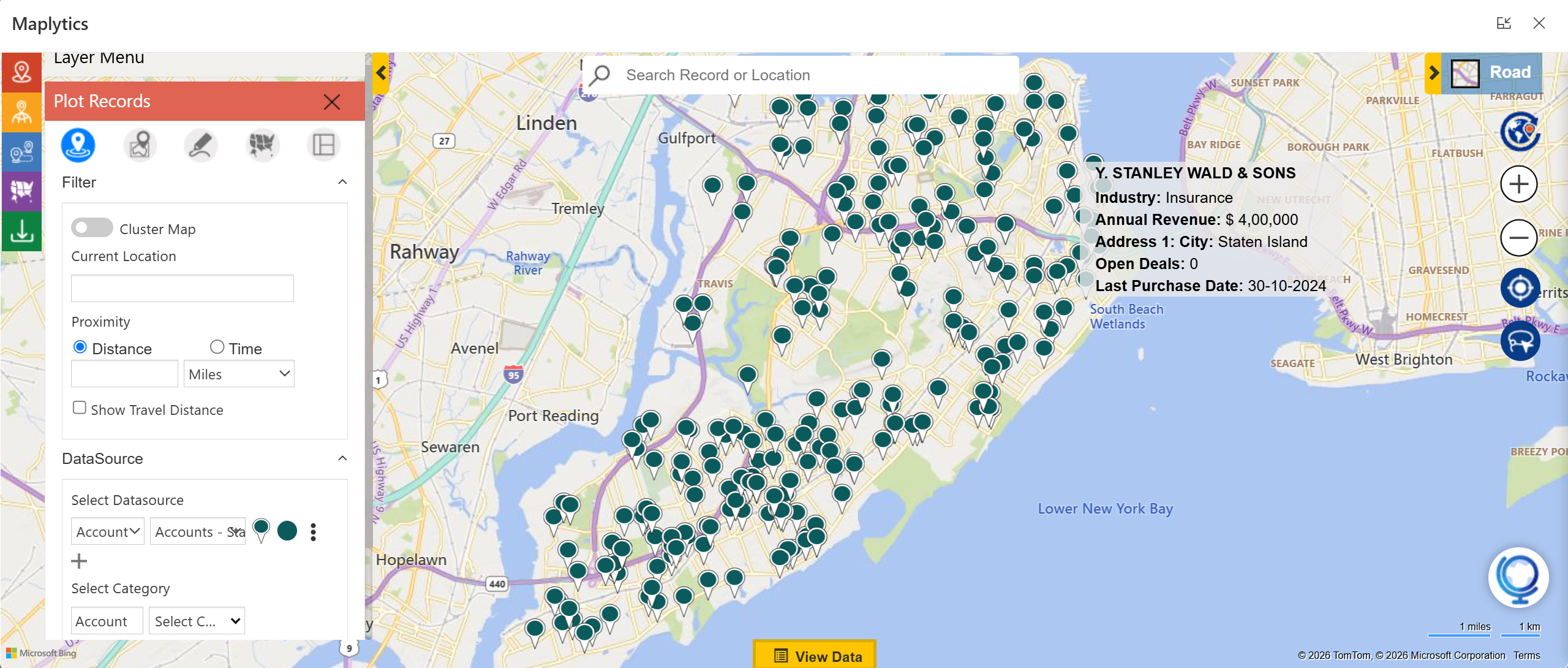 For branch managers overseeing multiple advisers, the same map shows the full team’s client distribution, making it immediately clear where coverage is concentrated and where gaps exist.
Use Case 2: Using Territory Management for Banking and Insurance Networks
The Problem: A regional bank with forty branch managers and a national insurance company with field underwriters both share the same structural challenge. Unclear territory boundaries creating coverage overlaps, accountability gaps, and reps inadvertently competing for the same clients.
Maplytics in Action: Territory Management in Maplytics allows financial services organizations to draw, assign, and balance territories directly on the map inside Dynamics 365. Territories can be defined by postcode, region, or revenue band, and balanced by client count or portfolio value. Draft Territory lets managers test realignments before going live, critical in financial services where client reassignments carry relationship risk and require careful handling.
Each adviser sees only their territory. Branch managers see everything. Coverage gaps and overlaps are visible and correctable before they affect revenue or client experience.
Use Case 3: How Route Optimization is useful for Financial Field Teams.
The Problem: Insurance loss adjusters, mortgage field officers, and wealth advisers who visit clients at home or at business premises all face the same daily planning problem: multiple stops, wide geographies, and no optimized sequencing. The result is unnecessary driving, late arrivals, and fewer client interactions per day than the team is capable of.
Maplytics in Action: Route Optimization in Maplytics automatically sequences the day’s appointments into the most efficient order, factoring in live traffic, custom departure times, and travel mode. For an insurance adjuster handling five claims across a region, the difference between an ad-hoc route and an optimized one can be ninety minutes of driving time, time that translates directly into an additional client visit or a more thorough assessment at each location.
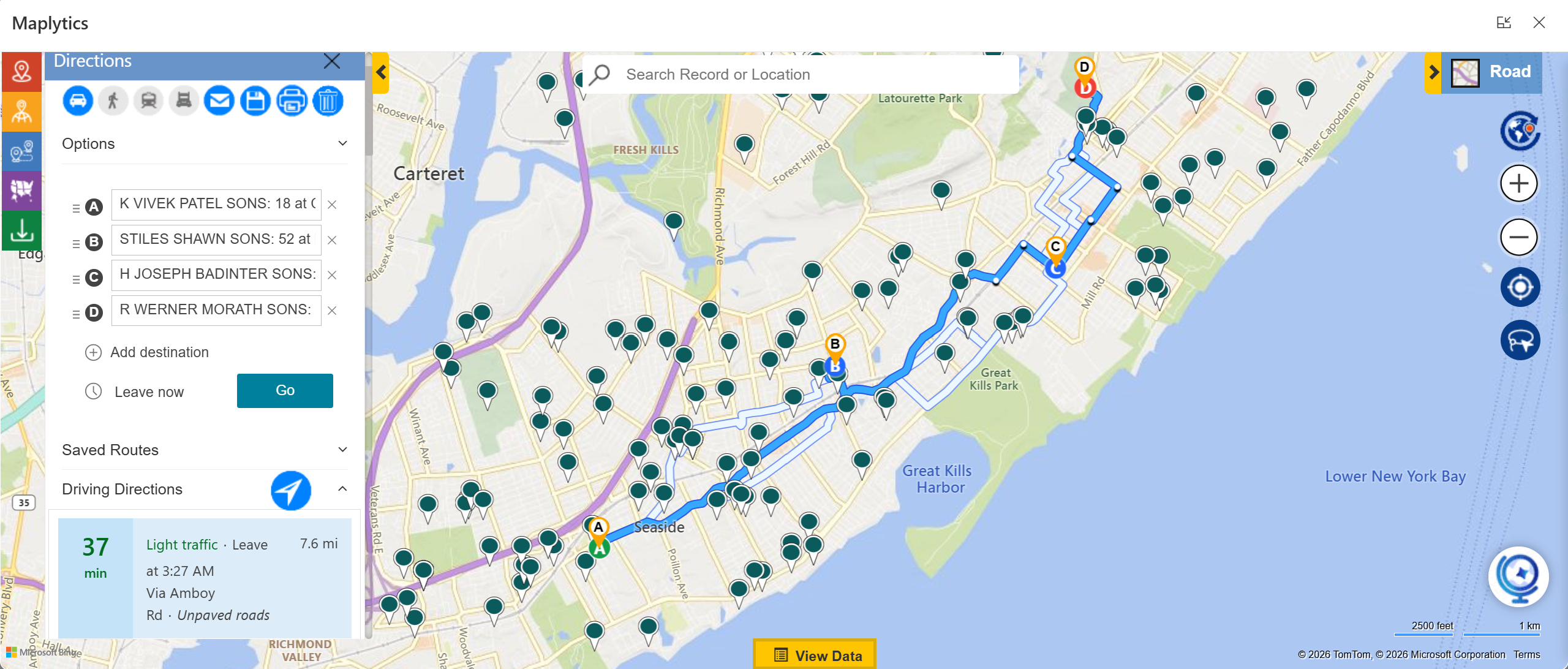 Routes are saved inside Dynamics 365, shareable across the team, and reusable for recurring service areas such as quarterly client review circuits.
Use Case 4: Can Proximity Search be used for Opportunistic Client Engagement?
The Problem: A relationship manager finishes a client meeting early. There are forty minutes before the next appointment. Somewhere nearby, some prospects have been sitting in the CRM for months, warm but untouched. Without a way to quickly identify who is nearby, the gap in the schedule is wasted.
Maplytics in Action: Radius Search surfaces every relevant CRM record within a defined distance or travel time of any location, prospects, lapsed clients, branch contacts, or referral partners. A relationship manager can identify a nearby prospect in seconds, add them to the route, and turn forty idle minutes into a spontaneous face-to-face conversation that no competitor was expecting.
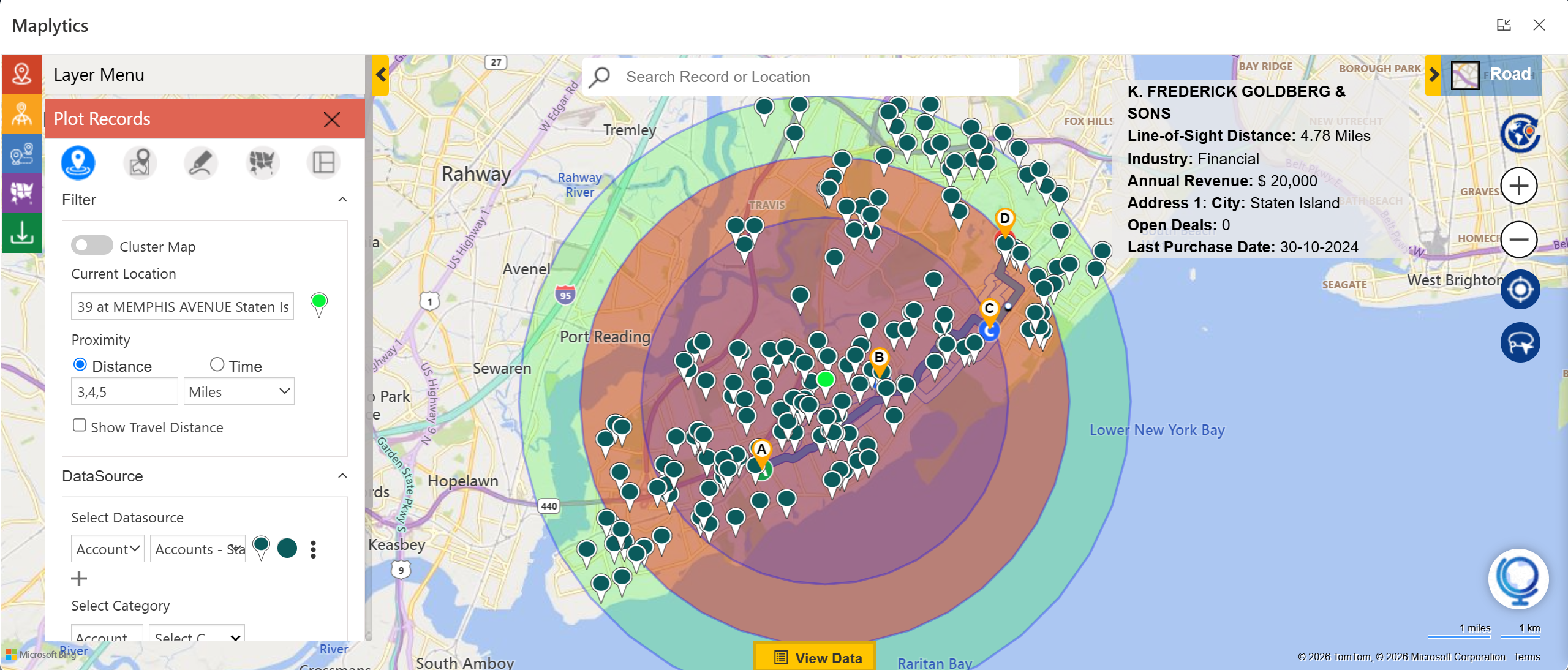 In financial services, where trust is built through personal contact and timing often determines which adviser wins a mandate, this kind of opportunistic engagement is not a minor benefit; it is a genuine competitive differentiator.
Use Case 5: Auto Scheduling for Compliance and Advisory Visit Cycles
The Problem: Financial services organizations operate under strict visit frequency requirements, quarterly reviews for wealth management clients, regular check-ins for insurance policyholders, and mandatory compliance visits for corporate accounts. Coordinating these cycles across a large field team, while tracking which visits have been completed and which are overdue, is a significant administrative burden.
Maplytics in Action: Auto Scheduling in Maplytics generates multi-day visit schedules for field advisers automatically, factoring in client location, adviser availability, meeting duration, travel time, and working hours. Recurring visit cycles can be configured once and scheduled automatically going forward, removing the manual effort of rebuilding the same schedule every quarter.

Geofencing and Check-In/Check-Out log every client visit with a timestamp and location verification, creating an audit trail inside Dynamics 365 that is invaluable for compliance reporting, client billing, and service level verification.
Use Case 6: Heat Map Analysis for Market Expansion and Branch Planning
The Problem: A retail bank planning to open three new branches in a metropolitan region needs to know where client density is high, but branch coverage is thin. A fintech company expanding into new markets needs to understand where its existing customer base clusters relative to competitor presence. Without a geographic view of the data, these decisions default to intuition or expensive third-party research.
Maplytics in Action: Heat Map Visualization in Maplytics overlays customer concentration, revenue density, or prospect volume across any region directly inside Dynamics 365. High-potential areas with low current coverage stand out immediately, pointing decision-makers toward where a new branch, a new adviser hire, or a targeted marketing push would deliver the strongest return.
For financial services organizations where branch placement, adviser deployment, and market entry decisions carry significant capital commitments, this kind of data-driven geographic visibility replaces guesswork with evidence.
To Sum Up
Financial services is an industry where the difference between a good adviser and a great one often comes down to time: time in front of clients, time not wasted on the road, time used opportunistically when a gap opens in the schedule.
Want to see multi-language, optimized, location-based maps within Dynamics 365 in action for your business?
If you are ready to bring automated planning to your organization’s Dynamics 365 environment, try Maplytics free for 15 days inside Dynamics 365. We would love to show you what a thinking map can do for your team. Maplytics with MapCopilot, its AI assistant, is available immediately for Dynamics 365, Power Apps, Power Pages, and Dataverse. Organizations interested in a personalized demo are also encouraged to contact Maplytics’ sales team at crm@inogic.com
For more information, visit our website or Microsoft Marketplace. One can hop onto the detailed Blogs, Client Testimonials, Success Stories, Industry Applications, and Video Library for quick query resolution. Technical docs for the working of Maplytics are also available for reference.
Kindly leave us a review or write about your experience on the Microsoft Marketplace or the G2 Website.

Sam Kumar
https://www.maplytics.comSam Kumar is the Vice President of Marketing at Inogic, a Microsoft Gold ISV Partner renowned for its innovative apps for Dynamics 365 CRM and Power Apps. With a rich history in Dynamics 365 and Power Platform development, Sam leads a team of certified CRM developers dedicated to pioneering cutting-edge technologies with Copilot and Azure AI the latest additions. Passionate about transforming the CRM industry, Sam’s insights and leadership drive Inogic’s mission to change the “Dynamics” of CRM.