The holiday season brings a surge in deliveries, tighter schedules, and greater pressure on logistics teams to get goods to the right destinations on time. Poorly planned routes, uneven geographic coverage, and limited field resources can create avoidable delays.
How can logistics companies prepare for the holiday rush? With Maplytics, a Dynamics 365 map integration solution, businesses can use route optimization, proximity search, and territory management to plan journeys, coordinate field operations, and make better use of available resources before peak season begins.
Key Takeaways
|
Why Does Holiday Delivery Planning Need More Than a List of Addresses?
Imagine a logistics company preparing for its busiest week of the year. Its team must coordinate gift deliveries, retail replenishment, warehouse transfers, and shipments to business customers across multiple locations.
The operations manager has hundreds of addresses in Microsoft Dynamics 365. But a list of addresses does not automatically reveal the most efficient route, whether delivery areas overlap, or where field resources might be needed.
Planning each journey manually can consume valuable time. Unnecessary travel can also leave teams with less time to complete their scheduled work.
This is where Dynamics 365 maps integration becomes useful. Maplytics, a certified geo-analytical mapping solution for Microsoft Dynamics 365 CRM and Dataverse, brings supported location records onto an interactive map. Teams can visualize geographic data, plan routes, manage territories, and make more informed decisions about field operations.
Let’s explore how these capabilities can help logistics businesses prepare for the holiday rush.
1. Route Optimization in Dynamics 365: Plan More Efficient Journeys
Consider a driver who needs to visit 25 delivery locations in one day. Visiting them in the order they appear in a spreadsheet may involve unnecessary backtracking across the city.
A more efficient stop sequence can help reduce avoidable travel and leave more time for deliveries, collections, or other scheduled activities.
Maplytics Route Optimization allows users to plot multiple waypoints and optimize routes based on travel distance or time. Teams can review route directions and use turn-by-turn navigation. Maplytics also supports truck routing with vehicle-specific parameters, helping logistics teams account for relevant vehicle restrictions when planning suitable journeys.
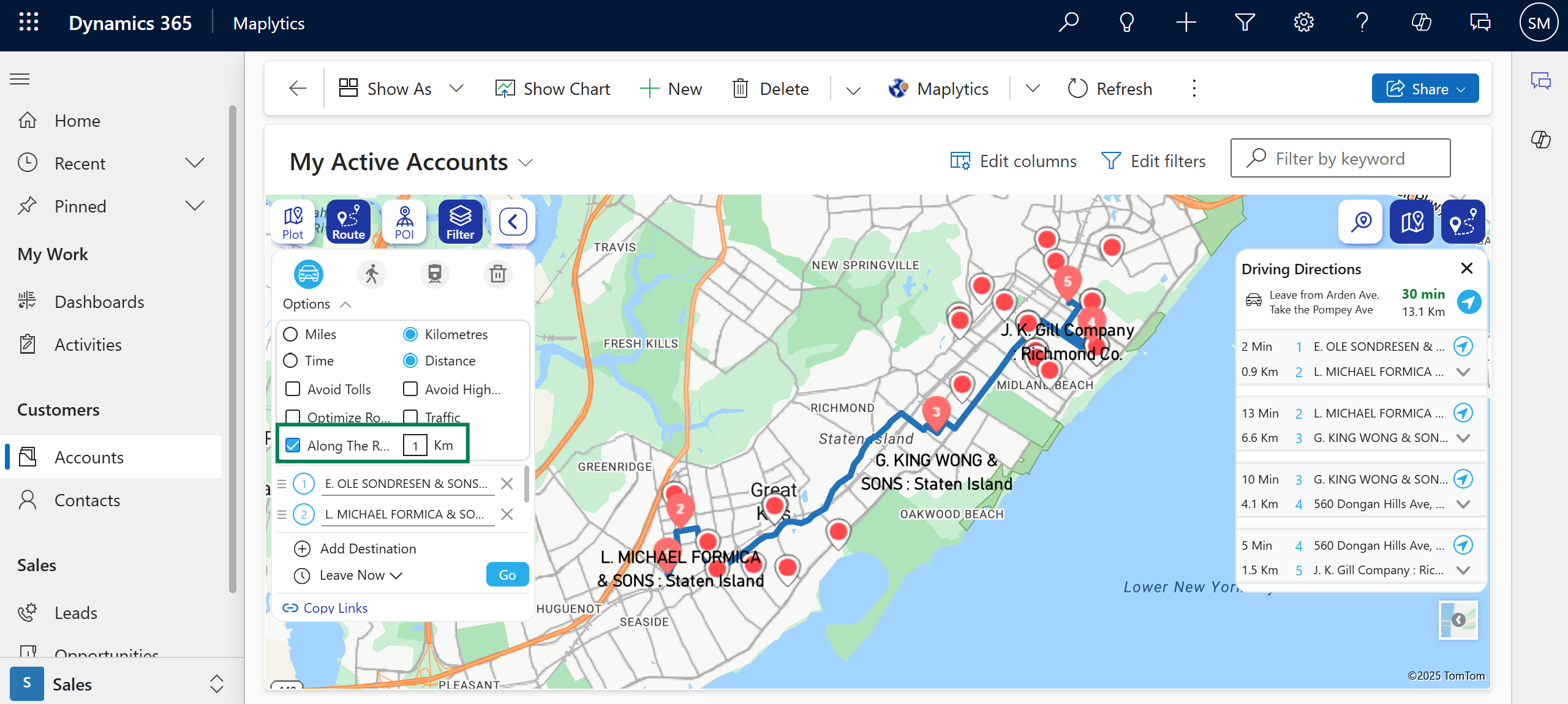 For example, a distribution manager can plot delivery locations for a particular area, optimize the sequence, and share the planned route with the assigned driver. The team can prepare routes before peak-season operations begin instead of relying entirely on manual planning.
This can help logistics teams use travel time more effectively. However, optimized routes alone cannot guarantee on-time deliveries. Traffic incidents, loading delays, inaccurate addresses, and other operational constraints still need attention.
Explore Maplytics Route Optimization to learn more.
2. Territory Management: How Can Logistics Companies Organize Geographic Coverage?
During the holiday rush, some areas may experience a much higher concentration of deliveries, collections, or service visits than others. If geographic coverage is poorly organized, teams may overlap in some areas while other locations receive insufficient attention.
Maplytics Territory Management allows users to create, visualize, align, and manage geographic territories. Territories can be created manually or through supported automated options using mapped records and geographic boundaries.
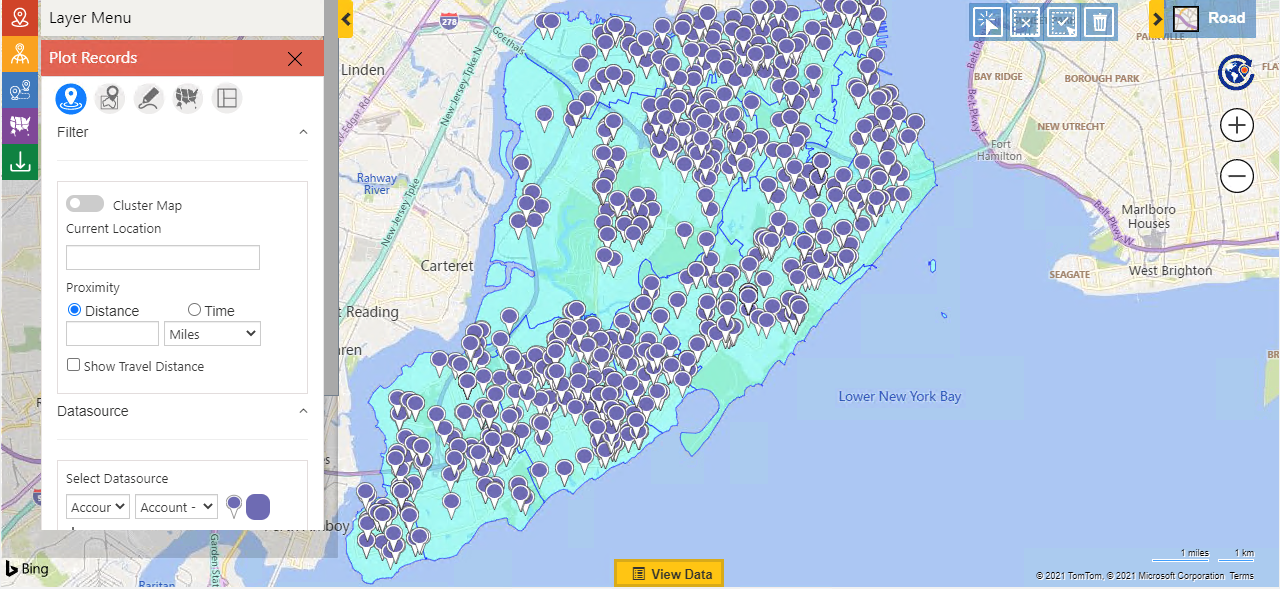
Before peak season, a logistics manager could review existing territories and determine whether current assignments still suit the operation. The team could identify overlapping coverage, review how locations are distributed, and adjust geographic assignments where necessary.
This is useful for distribution networks, regional delivery operations, and field teams that need clear geographic coverage.
Territory mapping does not automatically equalize workloads. Managers must also consider shipment volumes, driver availability, delivery priorities, and other operational data. Nevertheless, a map provides a clearer geographic foundation for making those decisions.
Learn more about Maplytics Territory Management.
3. Proximity Search Dynamics 365: Find Nearby Resources When Plans Change
Even a carefully prepared logistics plan can change. A vehicle may need assistance, a field team may require additional support, or an urgent assignment may need attention near an existing operational area.
Searching through long lists of names and addresses can slow down decisions.
Proximity search in Dynamics 365 helps users find mapped records within a specified distance or travel-time range from a selected location. Maplytics also supports radius-based searches, allowing users to define a geographic search area and visualize matching records.
For example, a logistics manager could search for relevant field resources near a busy distribution area, provided those resources are represented in Dynamics 365 and the necessary information is available.
This is where radius search in Dynamics 365 and radius search in Dynamics CRM become useful concepts for location-based operations. Instead of manually reviewing every address, teams can narrow their search to records within a relevant geographic area.
Proximity search can help identify nearby resources, but it does not independently determine whether a driver is available, whether a vehicle is suitable, or whether a shipment can be reassigned. Those decisions depend on the company’s operational systems and workflows.
Explore Maplytics Radius Search to learn more.
4. Auto-Scheduling and Real-Time Tracking: Coordinate Field Operations
Logistics planning involves more than choosing a route. Managers must also consider existing appointments, working hours, and the availability of field resources.
Maplytics Auto-Scheduling supports optimized schedules across multiple days and users, taking configured scheduling preferences and existing appointments into account. This can help teams organize eligible field activities in advance rather than managing every assignment manually.
For instance, a distribution company could prepare schedules for field visits and other location-based activities during the days leading up to a major holiday. The team can account for existing commitments while organizing its planned work.
Maplytics Real-Time Tracking provides visibility into the locations and travel history of tracked field representatives or resources. Managers can use this information to understand field activity and coordinate their teams during busy periods.

These capabilities support field coordination, but tracking a field resource is not the same as tracking an individual shipment. Parcel status, proof of delivery, and customer-facing delivery notifications require appropriate shipment-management systems and data.
5. Heat Maps and MapCopilot: Turn Location Data Into Useful Insights
Effective holiday preparation starts before the first shipment leaves the warehouse. Logistics teams can also review their existing location data to understand geographic patterns and identify areas that need closer attention.
Maplytics Heat Maps help visualize concentrations of mapped records using supported measures. A distribution company with suitable delivery-related records in Dynamics 365 could examine where those records cluster and use the results to inform geographic coverage and resource-planning discussions.
Heat maps do not automatically forecast future demand, but they can help teams interpret the location data they already have.
Maplytics also offers MapCopilot, an AI-powered assistant that lets users interact with mapped Dynamics 365 records through natural-language prompts. Supported operations include plotting records, performing proximity searches, and optimizing routes.
Together, these capabilities help teams explore location data and answer practical geographic questions more easily.
What Should Logistics Companies Check Before the Holiday Rush?
Before putting a holiday delivery plan into action, operations managers should review these essentials:
- Address quality: Ensure that relevant Dynamics 365 records contain usable location information.
- Route readiness: Prepare and review routes before drivers begin their shifts.
- Geographic coverage: Check whether territories and resource assignments suit operational needs.
- Resource availability: Validate schedules, vehicle suitability, and staff availability through the appropriate operational systems.
- Data and integration readiness: Confirm that relevant delivery, customer, or field-resource records are accessible in Dynamics 365 or Dataverse and that required integrations are configured.
Maplytics supports geographic planning and field operations. It is not a replacement for a dedicated transportation management, warehouse management, or parcel dispatch platform.
Prepare Your Logistics Operations for the Festive Rush
Behind every holiday delivery is someone waiting for a gift, a business depending on replenished stock, or a customer expecting an order. Logistics companies cannot control every road condition or unexpected delay, but they can improve how they plan routes, organize geographic coverage, and coordinate field resources.
With Maplytics, businesses using Microsoft Dynamics 365 can bring location intelligence into their operations through route optimization, territory management, proximity search, and other mapping capabilities.
Want to improve your location-based planning before the holiday rush? Explore Maplytics or contact crm@inogic.com to discuss how its Dynamics 365 maps integration can support your logistics operations.
Frequently Asked Questions
- How can Maplytics help logistics companies prepare for the holiday season?
Maplytics helps logistics teams visualize supported location records, optimize routes, manage geographic territories, search for nearby records, and plan eligible field activities. These capabilities can support more informed operational planning during peak periods.
- What is proximity search in Dynamics 365?
Proximity search in Dynamics 365 helps users find mapped records within a defined distance or travel-time range of a selected location. Maplytics provides this capability for supported Dynamics 365 and Dataverse records.
- What is the difference between radius search and proximity search in Dynamics CRM?
Radius search typically identifies records within a specified distance of a location. Proximity search can also use travel distance or travel time to identify nearby records. Maplytics supports distance-based and travel-time-based searches.
- Can Maplytics track shipments in real time?
Maplytics supports real-time tracking of field resources and their travel history. Tracking individual shipments, displaying parcel status, and providing proof of delivery require suitable shipment data and supporting systems.
- How does Dynamics 365 map integration help logistics teams?
Dynamics 365 map integration displays supported location records on an interactive map. Maplytics enables teams to use geographic visualization, route optimization, territory management, and proximity search to support location-based planning and field coordination.

Sam Kumar
https://www.maplytics.comSam Kumar is the Vice President of Marketing at Inogic, a Microsoft Gold ISV Partner renowned for its innovative apps for Dynamics 365 CRM and Power Apps. With a rich history in Dynamics 365 and Power Platform development, Sam leads a team of certified CRM developers dedicated to pioneering cutting-edge technologies with Copilot and Azure AI the latest additions. Passionate about transforming the CRM industry, Sam’s insights and leadership drive Inogic’s mission to change the “Dynamics” of CRM.