
First, a quick reality check on scale.
Canada is the world’s second-largest country by land area, stretching across nearly 10 million square kilometres and touching three oceans. Distances that would count as international travel in Europe are, for Canadians, just “not that far.” When someone in Canada casually mentions a “short drive,” they’re often talking about a scale most of the world doesn’t experience.
Picture being a field sales rep in that environment for the country’s leading construction equipment rental company. Your patch isn’t a suburb or a district. It might be an entire province. You’re tracking active job sites, prospects spread across industrial parks, and rental units that never sit still for long. Your CRM is packed with thousands of records, but until recently, every one of them was just another line in a list, with no way to tell how far apart anything actually was.
That was daily reality for Cooper Equipment Rentals before they brought Maplytics into their workflow.
| Key Takeaways
A list tells you what exists in your CRM; a map integration for Dynamics 365 tells you where it is, and what to do about it next. A cancelled meeting or an early finish no longer has to mean idle time once maps in Dynamics 365 make nearby opportunities visible instantly. Route optimization in Dynamics CRM, through Route Optimization, Proximity Search, and Along the Route, shifts a rep’s day from reactive to intentional, powering smarter sales route optimization in Dynamics 365. Heat Maps, built on the same Dynamics 365 map foundation, give leadership a strategic, territory-wide view that supports territory management in Dynamics 365, something no individual rep’s dashboard could offer on its own. |
The Problem: A CRM Full of Data, None of It Mapped
Cooper Equipment Rentals runs 80 branches across Canada, renting out everything from aerial lifts and excavators to generators, climate control units, and trench safety equipment. If a job site needs it, chances are Cooper stocks it.
Covering that footprint means their sales team operates across one of the more logistically demanding territories anywhere. And for years, their CRM, full of accounts, opportunities, active job sites, and prospects, offered no way to see any of it geographically. Just an extremely long list.
Planning a day’s route meant working from that list the way someone might try to plan a cross-country trip using a spreadsheet instead of an actual map: manually checking addresses, guessing at drive times, and ultimately falling back on habit, visiting whoever came to mind rather than whoever was actually closest.
And when a visit wrapped up early, or an appointment got cancelled, that reclaimed time usually went nowhere. With no quick way to see what else was nearby, reps defaulted to simply heading toward their next scheduled stop, even if three promising, long-neglected prospects sat just ten minutes away.
Turning CRM Records Into a Living Map
Once Cooper connected Maplytics to their existing Microsoft Dynamics 365 setup, the change was immediate: every record in the CRM, every job site, account, prospect, and active rental, became a pin on a live, interactive map, viewable right inside the CRM they were already using.
No separate platform. No exporting data. No second login to manage. The map lived inside the same system reps opened every day.
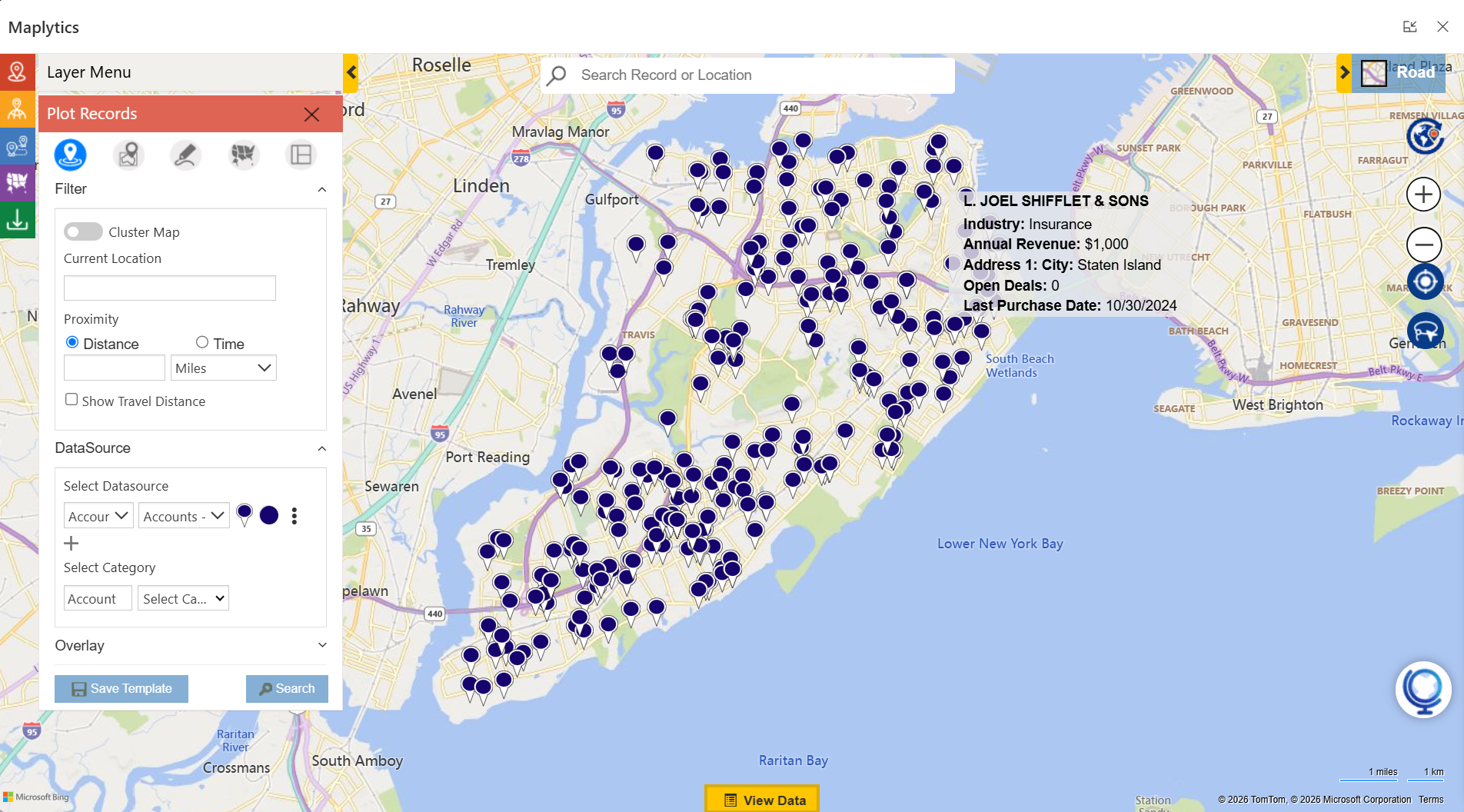 What used to be a flat list that revealed nothing about location became a map that showed everything at a glance. Color-coded pins made it easy to distinguish active customers from prospects, rental sites from job sites, and high-priority accounts from ones that had gone cold. A picture of the entire territory, once something only stored in a rep’s memory, was now visible to the whole team.
What Actually Changed Day to Day
Route Optimization replaced the old habit of following whatever order appointments happened to land on the calendar. The system now sequences every stop into the most efficient path automatically, with less time spent driving in circles and more time actually spent with customers.
Proximity Search turned cancellations and early finishes into opportunities instead of dead time. Reps can pull up every nearby account, prospect, or job site within a set radius of their current position and fill an unexpected gap with a productive, unplanned visit.
Along the Route made the drive between confirmed appointments useful in its own right. Prospects and accounts sitting near the planned path surface automatically, so a rep can slot in an extra stop without meaningfully lengthening the day.
Save Route meant reps who service the same cluster of contractors week after week don’t need to rebuild their route from scratch each time. Plan it once, save it, and reuse it- essentially a playlist, but for job sites instead of songs.
Heat Map Visualization gave Cooper’s managers a way to zoom out from any single rep’s daily route and see the bigger picture: where customer density is highest, where service gaps exist, where a new branch might make sense, and whether time on the ground actually lines up with where the opportunity is.
What Cooper Gained
- More customer visits fit into each day
- Lower fuel spend
- Fewer unproductive gaps between appointments
- Sharper, data-backed decisions about where to expand
- A sales team working from a live, shared picture of the territory instead of a mental one that’s always a little out of date
For an operation spanning 80 branches across a country the size of Canada, that’s not a minor upgrade. It’s the difference between field operations built to scale and field operations that eventually hit a wall once the CRM list becomes too unwieldy to navigate.
The complete story, including specifics on how each feature fits into Cooper’s day-to-day operations, direct feedback from the team, and what it looks like running live inside Dynamics 365, is worth reading in full.
Something is clarifying about seeing how a national equipment rental operation solved a problem this large simply by putting a map inside their CRM. It’s the kind of story that makes you glance back at your own CRM’s list view and ask a fairly uncomfortable question:
Why is this still just a list?
Read the full Cooper Equipment Rentals success story here.
Frequently Asked Questions
Q1: Can Dynamics 365 be integrated with Google Maps?
Yes. Maplytics adds Google Maps/ Azure Maps/ Bing Maps, or Mapbox integration to Dynamics 365, letting teams plot CRM records, plan routes, and send directions straight to Google Maps, alongside support for Bing, Azure Maps, and Mapbox, so you’re not tied to a single provider.
Q2: How can Dynamics CRM data be viewed on a map?
Maplytics plots records, accounts, leads, opportunities, and more, directly from Dynamics 365 onto an interactive map, giving teams a geographic view of their CRM data instead of relying on static list views.
Q3: Is Azure Maps integration available for Dynamics 365?
Yes. Maplytics supports Azure Maps within Dynamics 365, allowing organizations to visualize records, run searches, and build routes using Microsoft’s own mapping infrastructure, a natural choice for teams already standardized on Azure.
Q4: How does route optimization work in Dynamics CRM?
Route optimization through Maplytics calculates the most efficient path across multiple stops. Users define an origin, destination, and waypoints, then optimize by shortest time, shortest distance, or direction, with the option to avoid traffic, tolls, or highways.
Q5: Can route optimization support territory-based sales planning in Dynamics 365?
Yes. It groups appointments by geography, helping reps build multi-stop routes within their assigned territory instead of crossing back and forth inefficiently, cutting both drive time and unnecessary mileage.
Q6: How is territory management handled visually in Dynamics 365? Maplytics lets managers draw, adjust, and assign sales or service territories directly on a map, then plot accounts inside each one to catch coverage gaps or overlapping assignments between reps.
Q7: Does Dynamics 365 include territory mapping by default? No, territory mapping isn’t a native Dynamics 365 feature. Maplytics adds this functionality, allowing territories to be built, saved, and reused directly within the existing Dynamics 365 environment.
Q8: Can Dynamics 365 build a single route covering several appointments in one day?
Yes. Maplytics sequences multiple appointments into one optimized route complete with turn-by-turn directions, estimated travel time, and distance between each stop.
Q9: Is there a map-based way to browse CRM records like leads and accounts?
Yes. Maplytics gives users a geographic view of leads, accounts, opportunities, and other records, with filtering, search, and the ability to drill into record details directly from the map.
Q10: How does basic map integration differ from full route mapping in Dynamics CRM?
Basic map integration simply places CRM records on a map by location. Route mapping goes further, sequencing those same records into a navigable, optimized route with waypoints, travel preferences, and one-click export to apps like Google Maps or Waze.
Take It Further
If you are ready to bring automated planning to your organization’s Dynamics 365 environment, try Maplytics free for 15 days inside Dynamics 365. We would love to show you what a thinking map can do for your team. Maplytics with MapCopilot, its AI assistant, is available immediately for Dynamics 365, Power Apps, Power Pages, and Dataverse. Organizations interested in a personalized demo are also encouraged to contact Maplytics’ sales team at crm@inogic.com
For more information, visit our website or Microsoft Marketplace. One can hop onto the detailed Blogs, Client Testimonials, Success Stories, Industry Applications, and Video Library for quick query resolution. Technical docs for the working of Maplytics are also available for reference.
Kindly leave us a review or write about your experience on the Microsoft Marketplace or the G2 Website.

Sam Kumar
https://www.maplytics.comSam Kumar is the Vice President of Marketing at Inogic, a Microsoft Gold ISV Partner renowned for its innovative apps for Dynamics 365 CRM and Power Apps. With a rich history in Dynamics 365 and Power Platform development, Sam leads a team of certified CRM developers dedicated to pioneering cutting-edge technologies with Copilot and Azure AI the latest additions. Passionate about transforming the CRM industry, Sam’s insights and leadership drive Inogic’s mission to change the “Dynamics” of CRM.