Route optimization can cut windshield time by up to 30%, allowing reps to spend more time with customers instead of driving.
Route optimization is a key capability for any business that sends field teams, sales reps, or service technicians out on the road daily. It means sequencing stops intelligently, reducing travel time, cutting fuel costs, and ultimately making teams more productive. When integrated into CRM workflows, route optimization becomes a strategic advantage.
In this Q&A blog, we break down everything you need to know about Route Optimization in Maplytics, a certified, geo-mapping solution built natively for Microsoft Dynamics 365 and Dataverse.
What is Route Optimization?
Route optimization refers to the process of arranging a set of waypoints, typically customer visits, service calls, or sales appointments, into an order that minimizes travel time or distance. Rather than manually choosing which stop to visit first, optimization algorithms calculate the most efficient sequence based on your goals.
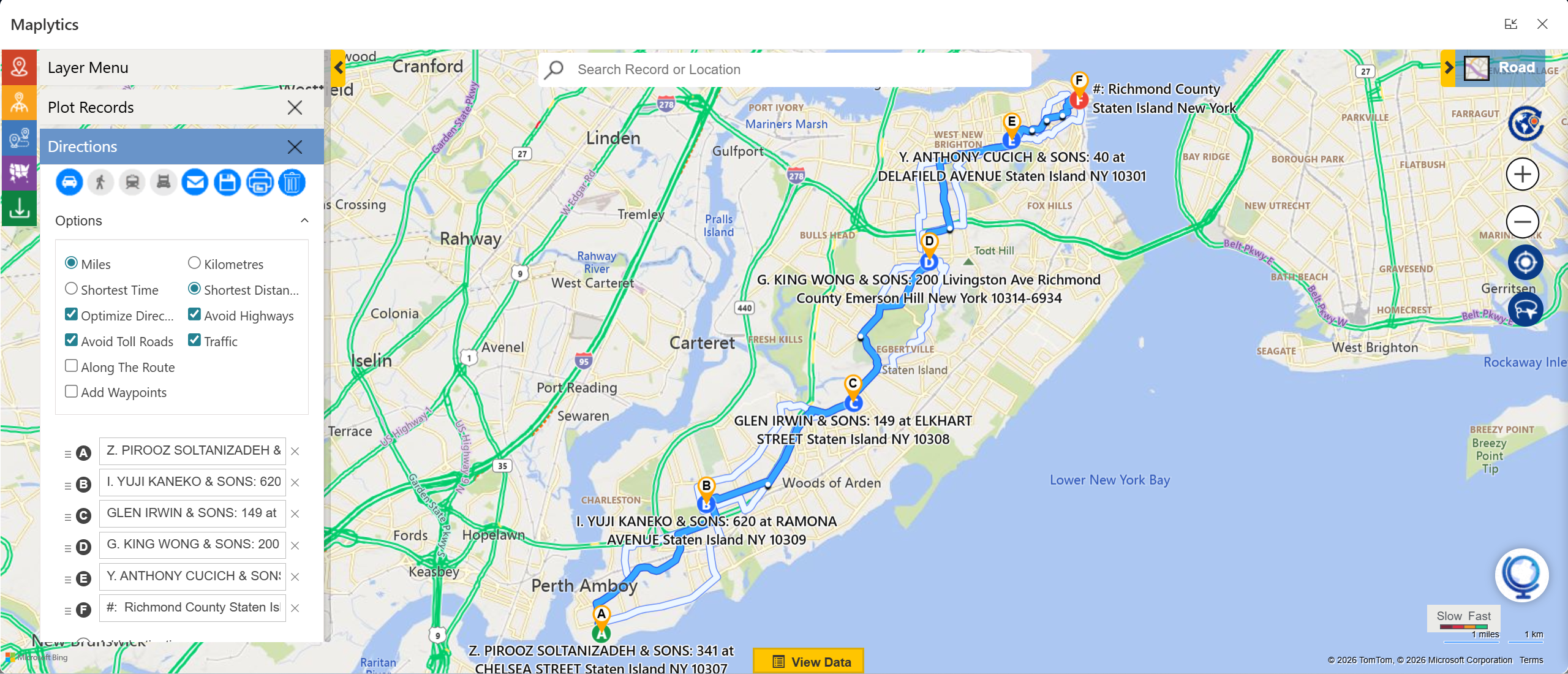
With Maplytics, this means a user can select an origin, destination, and one or more intermediate stops to automatically generate an optimized route that reduces driving time, fuel costs, and unnecessary backtracking. The optimization can focus on the shortest travel time or shortest travel distance, depending on your configuration.
How Does Route Optimization Work in Maplytics?
Maplytics uses location intelligence tied directly to your CRM data. Once you select records as waypoints, whether accounts, leads, work orders, or custom entities. Maplytics reorders these stops to create the most efficient travel sequence.
In practice, the user simply:
- Opens the Route Card in the map interface.
- Specifies an origin and destination.
- Adds additional stops by selecting records from the map or through search by name.
- Chooses optimization preferences (shortest time or distance).
- Clicks Go, and Maplytics plots the optimal route.
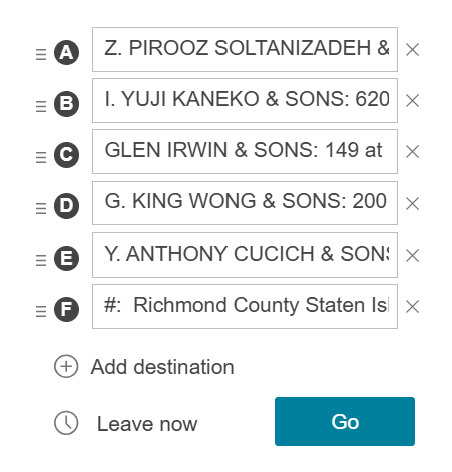 This streamlines route planning by automating the ordering of stops rather than requiring manual sequencing.
What Travel Modes Are Supported?
Maplytics supports multiple travel modes to suit different field scenarios:
- Driving: Optimized for road vehicles and includes traffic considerations.
- Walking: Best for pedestrian paths or urban areas.
- Public Transit: Uses buses, trains, and other transit options where available.
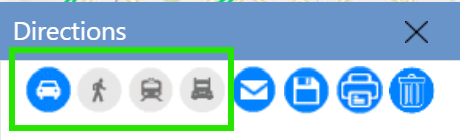
Different travel modes ensure that teams plan routes appropriate to their mode of travel, whether by vehicle, on foot, or using local transport.
What Options Can I Customize in Maplytics Route Optimization?
Maplytics provides a wide range of route options that let businesses tailor routing to their needs:
- Distance Unit: Choose miles or kilometers.
- Optimize By: Select whether the algorithm prioritizes shortest distance or shortest travel time.
- Avoid Tolls: Excludes toll roads from routes to save costs.
- Avoid Highways: Plans routes that avoid major highways.
- Traffic Integration: Real-time traffic updates are factored into route calculations.

- Along the Route Search: Finds CRM records within a defined distance of the route, helping field teams discover opportunities or tasks near their path.
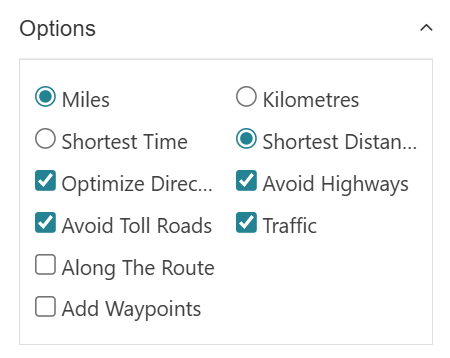
These options enable planners to strike a balance between speed, cost, and operational goals when defining route parameters.
Can I Add Waypoints from CRM Data?
Yes. Instead of manually typing addresses, users can add waypoints directly from CRM records. Clicking a pushpin on the map or using a lookup search pulls in records such as accounts, contacts, or custom entities as part of the route.
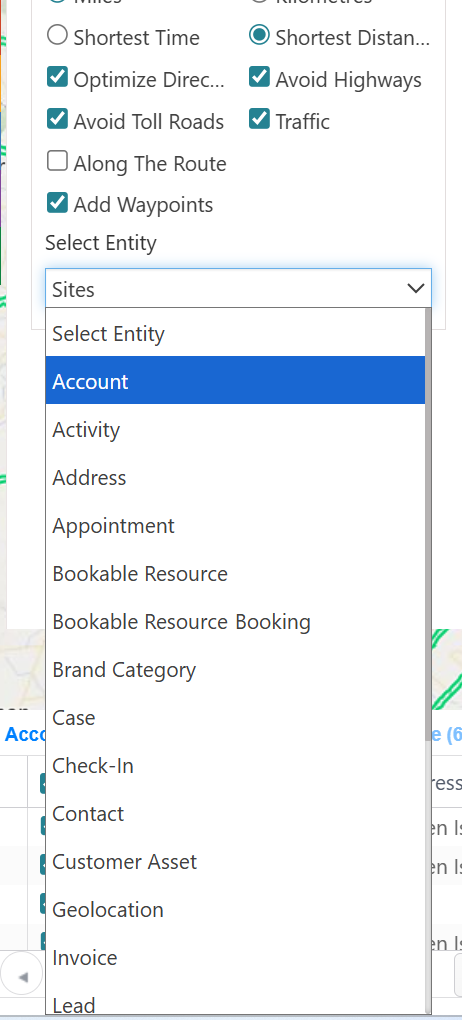 This tight CRM integration is what differentiates Maplytics from standalone route planners. Every stop is tied to real business data, with full context available at each touchpoint.
What Are the Directions and Navigation Options?
Once a route is plotted, Maplytics provides a Directions Card that displays:
- Turn-by-turn directions.
- Travel time and distance for each leg.
- Total time and distance for the full route.
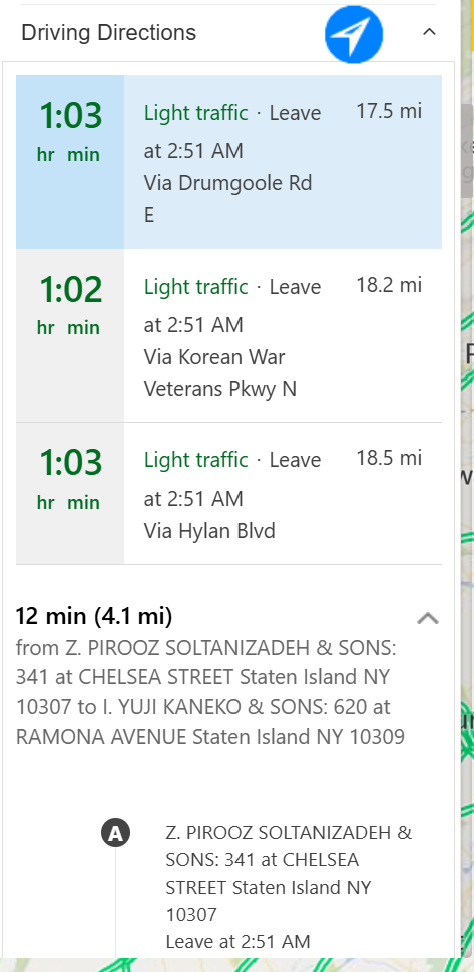 Users also have the option to navigate the full route with preferred navigation apps like Google Maps, Apple Maps, or Waze, or get guidance between specific waypoints using Google Maps, Waze, or Apple Maps. Sharing route links via email or messaging helps field reps access directions instantly on their mobile devices.
How Do Saved Routes Work?
Maplytics allows users to save optimized routes. Saved routes store details like total distance, number of waypoints, and route sequence. You can:
- Save a route with a name and owner.
- Add the route to an existing set or create new ones.
- Update saved routes when plan adjustments are needed.
- View multiple saved routes together, useful for managers overseeing multiple field reps.
This is especially helpful for planning recurring travel patterns or preparing routes in advance.
What is “Along the Route” Search?
The Along the Route Search feature highlights CRM records that fall within a defined distance of a plotted route. For example, if a route is plotted between key stops, Maplytics can show all the nearby customers or opportunities within a configurable range (default 0.5 units).
This is highly useful for identifying additional opportunities or service calls that can be catered to without deviating significantly from the primary path.
Does Traffic Affect Route Optimization?
Yes. Maplytics incorporates real-time traffic data into its optimization calculations. This means that routes consider current conditions like congestion so field teams can avoid delays and reach appointments on time, especially critical for time-sensitive visits.
How Does Route Optimization Align with CRM Workflow?
As Maplytics is integrated into Microsoft Dynamics 365 and Dataverse,
- Routes are directly linked to CRM records.
- Navigation and visits become part of the CRM workflow rather than external processes.
- Field reps get context at each stop, including customer details, activity history, and next best actions.
This CRM synergy ensures that routing doesn’t exist in isolation, but informs and is informed by the broader customer engagement strategy.
Are There Advanced Scenarios Like Truck Routing?
Yes, Maplytics also supports truck route planning. Users can specify asset details like trailer type, dimensions, weight units, and whether they are carrying hazardous materials. While the shortest distance optimization may not apply to trucks due to size or route constraints, this functionality helps logistics teams plan routes with vehicle-specific considerations.
What Are the Key Business Benefits of Route Optimization?
Effective route optimization delivers multiple measurable benefits:
- Reduced travel time and fuel costs, keeping teams productive on the road.
- Improved punctuality and customer satisfaction with on-time service.
- Higher daily visit counts, enabling sales reps and service technicians to do more.
- Increased operational efficiency through better resource allocation.
In real business cases, organizations using optimized routing have reported significant time savings, allowing more visits per day and reduced operational costs.
Some more FAQs-
Q: How many waypoints can I use in a route?
Maplytics allows adding up to 25 waypoints in a single route, giving flexibility for multi-stop itineraries.
Q: Can I avoid tolls and highways?
Yes, Maplytics provides options to exclude toll roads or avoid highways based on your routing preferences.
Q: Can I view my route on external navigation apps?
Yes, Maplytics supports links to Google Maps, Waze, or Apple Maps for navigation.
Q: Can I share optimized routes with my team?
Absolutely. Routes can be shared via email and prints with full details, including CRM data and turn-by-turn navigation directions.
What’s more?
With Maplytics, route planning becomes intuitive, flexible, and deeply integrated into your CRM workflows. Maplytics is available immediately as part of the for Dynamics 365, Power Apps, Power Pages, and Dataverse. Organizations interested in adoption, 15-day free trials, or personalized demos are encouraged to contact Maplytics’ sales team at crm@inogic.com
For more information, visit our website or Microsoft Marketplace. One can hop onto the detailed Blogs, Client Testimonials, Success Stories, Industry Applications, and Video Library for a quick query resolution. Technical docs for the working of Maplytics are also available for reference.
Kindly leave us a review or write about your experience on the Microsoft Marketplace or the G2 Website.

Sam Kumar
https://www.maplytics.com/Sam Kumar is the Vice President of Marketing at Inogic, a Microsoft Gold ISV Partner renowned for its innovative apps for Dynamics 365 CRM and Power Apps. With a rich history in Dynamics 365 and Power Platform development, Sam leads a team of certified CRM developers dedicated to pioneering cutting-edge technologies with Copilot and Azure AI the latest additions. Passionate about transforming the CRM industry, Sam’s insights and leadership drive Inogic’s mission to change the “Dynamics” of CRM.