

A Manager’s Notebook, Six Months In
Hi, I’m Pam. I manage a field sales team of twelve, spread across three states.
Six months ago, I could have told you our pipeline numbers, our win rate, even our average deal size, down to the decimal. What I couldn’t tell you was why Ronan, one of my quietest reps, kept closing 20% more deals than everyone else on the team while working the same hours as the rest.
I assumed it was talent. Turns out, it was habits.
Ronan wasn’t smarter. He wasn’t working longer days. He just did five small things differently, things that had nothing to do with pitching and everything to do with how he moved through his day.
Once I looked closely, I realized these weren’t personality traits. They were repeatable habits, and once we built them into the way the whole team worked, the gap between our best and average reps started closing quickly.
Key Takeaways
|
Here are the five habits, and what changed once we stopped treating them as one rep’s personal quirks and started treating them as strategy.
Habit 1: He Never Built His Own Calendar
Most reps spend their mornings deciding who to see, in what order, and when. Ronan never did.
For years, our reps started each day by manually piecing together a schedule, checking who was free, guessing at drive times, moving things around when someone cancelled. It ate into selling time before selling even began.
Ronan’s calendar, on the other hand, was already built for him. Appointments across his entire territory were automatically sequenced, factoring in location, travel time, and priority, not just whoever happened to reply to an email first.
Application
Once we rolled Auto Scheduling out to the full team, the morning scramble mostly disappeared. Reps opened their day already knowing where to go and in what order, instead of spending the first twenty minutes of every morning just figuring that out.
Auto-built schedules help teams:
- Cut down daily planning time
- Reduce scheduling conflicts across a territory
- Balance a rep’s day realistically instead of overloading it
- Free up mental energy for actual selling
Habit 2: He Knew What Was Happening in the Field Without Asking
I used to find out about a delay after the client had already called to complain.
For most of my team, “checking in” meant a phone call or a Slack message after something had already gone wrong. Ronan’s manager (a peer team lead) never had to chase him for updates, because the map already showed where he was, and where he was supposed to be.
Application
With Real-Time Tracking, I can see a rep’s actual position against their planned route, live. When someone’s running behind, I know before the client does, and I can give a heads-up instead of doing damage control after the fact.
Real-time visibility helps managers:
- Catch delays before they become complaints
- Reallocate a nearby rep when plans change last-minute
- Coach based on what’s actually happening, not what’s reported after
- Build trust with clients through proactive updates
Habit 3: He Never Left a Client Site Without Checking What Else Was Nearby
A ten-minute stop can turn into a second (or third) opportunity if you actually look.
Most reps finish a visit and drive straight to the next scheduled stop. Ronan had a habit of pausing for thirty seconds first, checking what else was sitting within a few minutes of where he already was.
Application
Using Point of Interest Search, a rep can instantly see nearby prospects, partner locations, or even relevant public places (like a supplier or a client’s other branch) around their current stop. One of Ronan’s “extra” visits, found this way, turned into our second-largest deal that quarter.
Checking what’s nearby helps reps:
- Turn single-purpose visits into multi-stop trips
- Discover opportunities that never would have surfaced from a lead list
- Make better use of time already spent commuting
- Build denser, more efficient coverage of a territory over time
| Experience Maplytics in your own environment. Download a 15-day free trial and explore location intelligence inside Dynamics 365. Download Free Trial |
Habit 4: He Never Re-Planned the Same Trip Twice
If you visit the same cluster of clients every month, why start from zero every time?
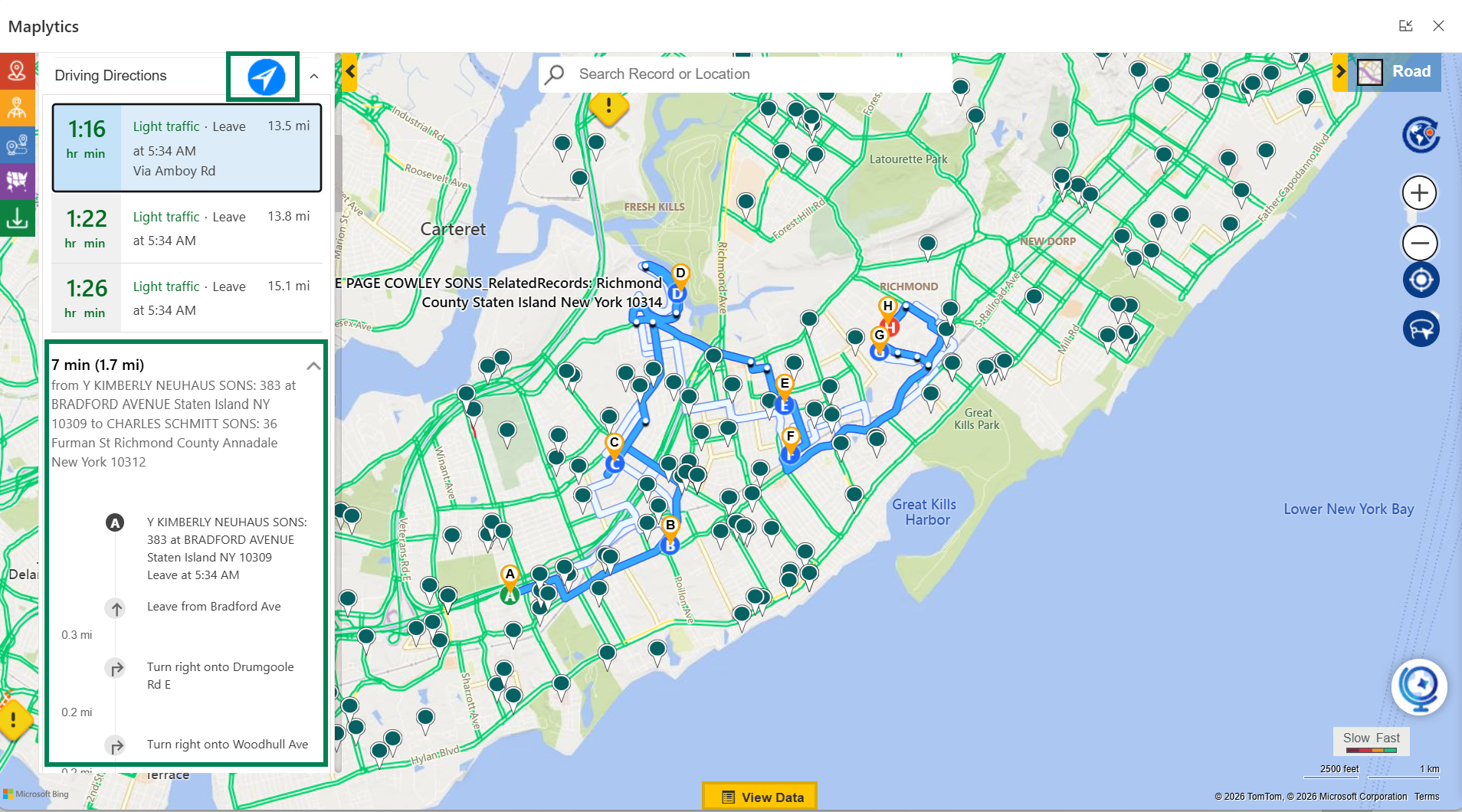
Several of Ronan’s accounts were recurring, the same group of clients, visited on a rough monthly cadence. Instead of rebuilding that route from scratch each time (like most of the team did), he saved it once and reused it.
Application
With Save Route, a rep can store a proven multi-stop route and pull it back up whenever that cycle comes around again, adjusting only what’s actually changed. What used to take Ronan fifteen minutes of replanning now takes him under a minute.
 Reusable routes help teams:
- Eliminate repetitive planning work for recurring visits
- Keep consistent coverage of long-term accounts
- Onboard new reps faster by handing them a ready-made route
- Reduce the odds of a regular client getting missed in a busy week
Habit 5: He Sold Just as Effectively From His Phone as From His Desk
Most of our CRM felt like a desktop tool. Ronan barely opened a laptop.
For a long time, our reps treated the CRM as something you dealt with after a day in the field, back at a desk, catching up on notes. Ronan did almost everything from his phone, between appointments, in a parking lot, on a five-minute break.
Application
Because Maplytics works consistently across desktop, tablet, and mobile, a rep isn’t stuck waiting until evening to log a visit, check a nearby lead, or glance at today’s route. The CRM travels with the rep, not the other way around.
Full mobile access helps teams:
- Keep CRM data current throughout the day, not just at night
- Make in-the-moment decisions using live information
- Reduce end-of-day admin backlog
- Support reps who are genuinely out in the field, not at a desk
The Real Difference Wasn’t Talent. It Was Design.
Once we looked closely, none of Ronan’s habits were about being a better closer. They were about removing friction, in planning, in visibility, in follow-through, before the selling conversation even started.
Auto Scheduling, Real-Time Tracking, Point of Interest Search, reusable routes, and full mobile access aren’t personality traits. They’re built-in advantages, and once the rest of the team had access to the same tools Ronan had been quietly relying on, the gap between our best and average performers started closing within a single quarter.
Some Common FAQs
- How does Auto Scheduling reduce a rep’s planning time? It builds a rep’s daily schedule automatically based on location, travel time, and appointment priority, removing the need to manually sequence visits each morning.
- What’s the benefit of real-time location tracking for sales managers? It gives managers live visibility into where reps actually are versus their planned route, allowing them to catch delays early and reassign resources when plans change.
- Can Maplytics help reps find opportunities they weren’t already looking for? Yes. Point of Interest Search surfaces nearby accounts, prospects, or relevant locations around a rep’s current position, often revealing opportunities that wouldn’t appear on a standard lead list.
- Is it possible to reuse a planned route for recurring client visits? Yes. A route can be saved once and reused for future cycles, with only the necessary adjustments made each time, rather than rebuilding the trip from scratch.
- Does Maplytics work well on mobile devices, not just desktop? Yes. Maplytics is built for mobility across devices, so reps can access maps, routes, and CRM data from a phone or tablet just as effectively as from a desktop.
- Is this approach only useful for large field sales teams? No. Even smaller teams benefit from reduced planning time, better territory awareness, and fewer missed opportunities, regardless of headcount.
What’s More?
If you are ready to bring automated planning to your organization’s Dynamics 365 environment, try Maplytics free for 15 days inside Dynamics 365. We would love to show you what a thinking map can do for your team. Maplytics with MapCopilot, its AI assistant, is available immediately for Dynamics 365, Power Apps, Power Pages, and Dataverse. Organizations interested in a personalized demo are also encouraged to contact Maplytics’ sales team at crm@inogic.com
For more information, visit our website or Microsoft Marketplace. One can hop onto the detailed Blogs, Client Testimonials, Success Stories, Industry Applications, and Video Library for quick query resolution. Technical docs for the working of Maplytics are also available for reference.
Kindly leave us a review or write about your experience on the Microsoft Marketplace or the G2 Website.

Sam Kumar
https://www.maplytics.comSam Kumar is the Vice President of Marketing at Inogic, a Microsoft Gold ISV Partner renowned for its innovative apps for Dynamics 365 CRM and Power Apps. With a rich history in Dynamics 365 and Power Platform development, Sam leads a team of certified CRM developers dedicated to pioneering cutting-edge technologies with Copilot and Azure AI the latest additions. Passionate about transforming the CRM industry, Sam’s insights and leadership drive Inogic’s mission to change the “Dynamics” of CRM.