If you are new to CRM systems, business software, or even tools like Microsoft Dynamics 365, terms such as mapping, AI assistant, or geo-intelligence can sound intimidating. Many people assume these tools are only for technical experts or data analysts. The truth is, they don’t have to be complicated at all.
This is exactly where MapCopilot comes in.
MapCopilot is designed for people who want answers quickly, without being experts in complex systems, writing queries, or understanding technical workflows. It helps you interact with your CRM data using simple language and visual maps. If you can ask a question or type a sentence, you can use MapCopilot.
This guide explains MapCopilot from the ground up, assuming limited CRM or technical knowledge. By the end, you’ll understand what MapCopilot is, why it exists, and how it makes everyday business tasks easier.
What is a CRM?
Before understanding MapCopilot, let’s start with the basic concept.
A CRM (Customer Relationship Management) system is like a digital notebook for a business. It stores information such as:
- Customer names and addresses
- Sales opportunities
- Service requests
- Meetings and visits
- Follow-ups and activities
Microsoft Dynamics 365 is one such CRM platform used by businesses to manage sales, service, marketing, and operations.
However, CRMs often show data in lists, tables, and forms. For someone new, this can feel overwhelming, as there are hundreds of records, multiple filters, and many clicks just to find simple information.
This is where maps teamed up with AI help.
What is Maplytics?
Maplytics is a mapping solution that connects maps directly to Microsoft Dynamics 365 and Dataverse. Instead of viewing customer data only as rows in a table, Maplytics shows that same data on an interactive Azure/Bing map.
With Maplytics,
- Customers appear as pushpins on a map
- Sales territories appear as colored regions
- Routes show how to travel between planned appointments and a lot more
Maplytics helps people understand where things are happening.
What is MapCopilot?
Now comes the most important part.
MapCopilot is an AI-powered assistant inside Maplytics.
Think of MapCopilot as a helpful colleague who understands your CRM data, your location, business context, natural language questions, and so on!
Instead of clicking a sequence of buttons, applying filters, or navigating screens, you can ask MapCopilot what you want to know or do.
For instance,
Instead of:
Open CRM → Go to Accounts → Apply filters → Select location → Plot on map
You say:
“Show accounts within 5 miles of my location.”
And it’s done.
 Why MapCopilot is Perfect for Beginners
 Why MapCopilot is Perfect for Beginners
MapCopilot is especially useful for people who:
- Are new to CRM systems
- Don’t need to learn technical steps for work competence
- Work in the field (sales, service, delivery)
- Need quick answers while on the move
You don’t need to understand how CRM records are structured, how maps are configured, or how search queries work.
MapCopilot handles all of that for you.
How Does MapCopilot Work?
MapCopilot works in three simple steps-
1. You ask a question
You type or speak a sentence in plain language.
2. MapCopilot understands the intent
It figures out:
- What data are you asking for
- Which location to use
- What map action is needed
3. Results appear instantly on the map
Records are plotted visually, routes are created, or insights are shown.
You don’t see the technical processing. You only see results.
What Can You Ask MapCopilot?
Let’s break this down into everyday use cases.
1. Finding Nearby Customers or Records
One of the most common beginner questions is:
“Who is near me right now?”
With MapCopilot, you can ask:
- “Find customers near my current location.”
- “Show accounts within 10 minutes of me.”
- “Plot leads around Staten Island.”
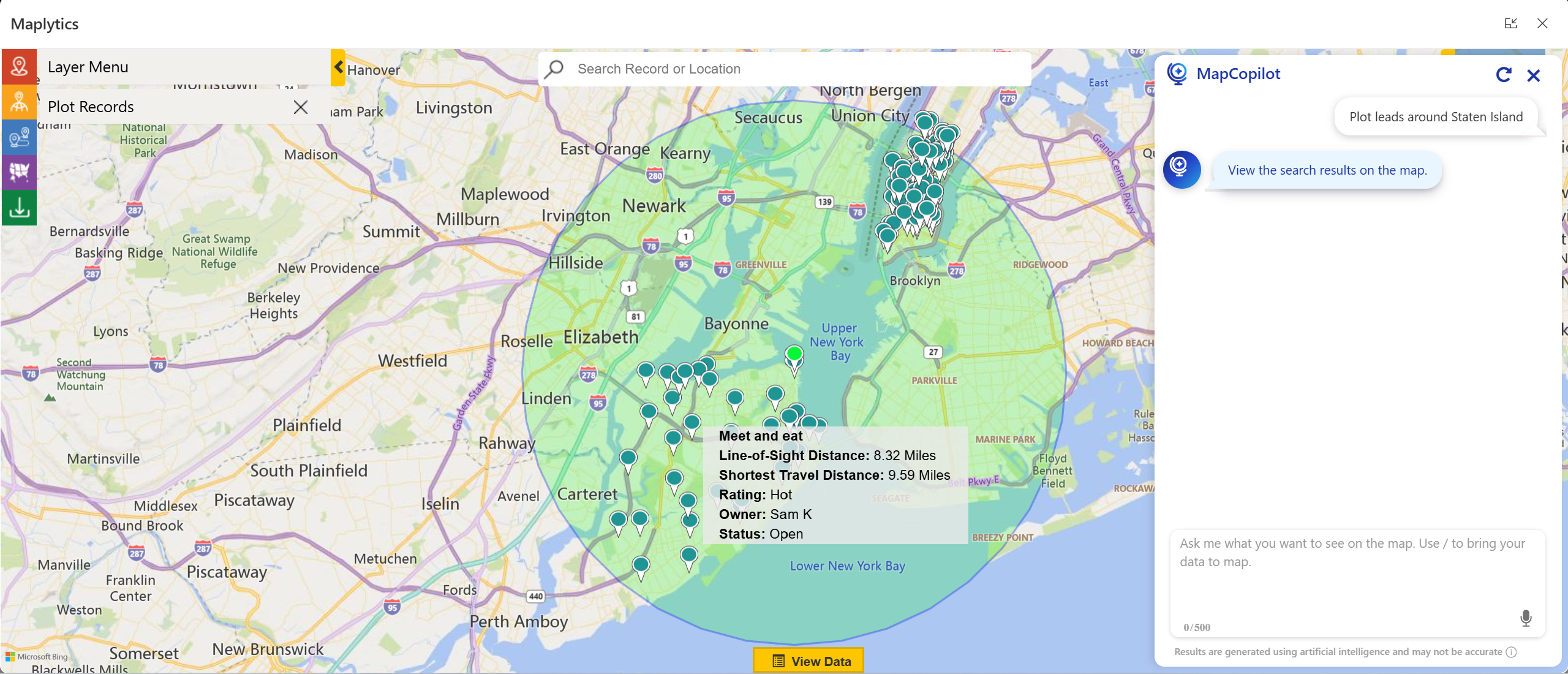 MapCopilot automatically uses Radius/Proximity Search for this and:
- Detects your location (if permitted)
- Applies distance or travel time
- Shows matching CRM records on the map
This is incredibly helpful for sales reps between meetings, service technicians looking for nearby jobs, managers checking regional coverage, etc.
2. Planning Routes Easily
Route planning can be stressful for beginners:
- Which customer should I visit first?
- How do I avoid backtracking?
- How do I fit more visits into one day?
With MapCopilot, you can say:
- “Plan a route to visit my top accounts today.”
- “Optimize route between these customers.”

- “Show the fastest route for today’s meetings.”
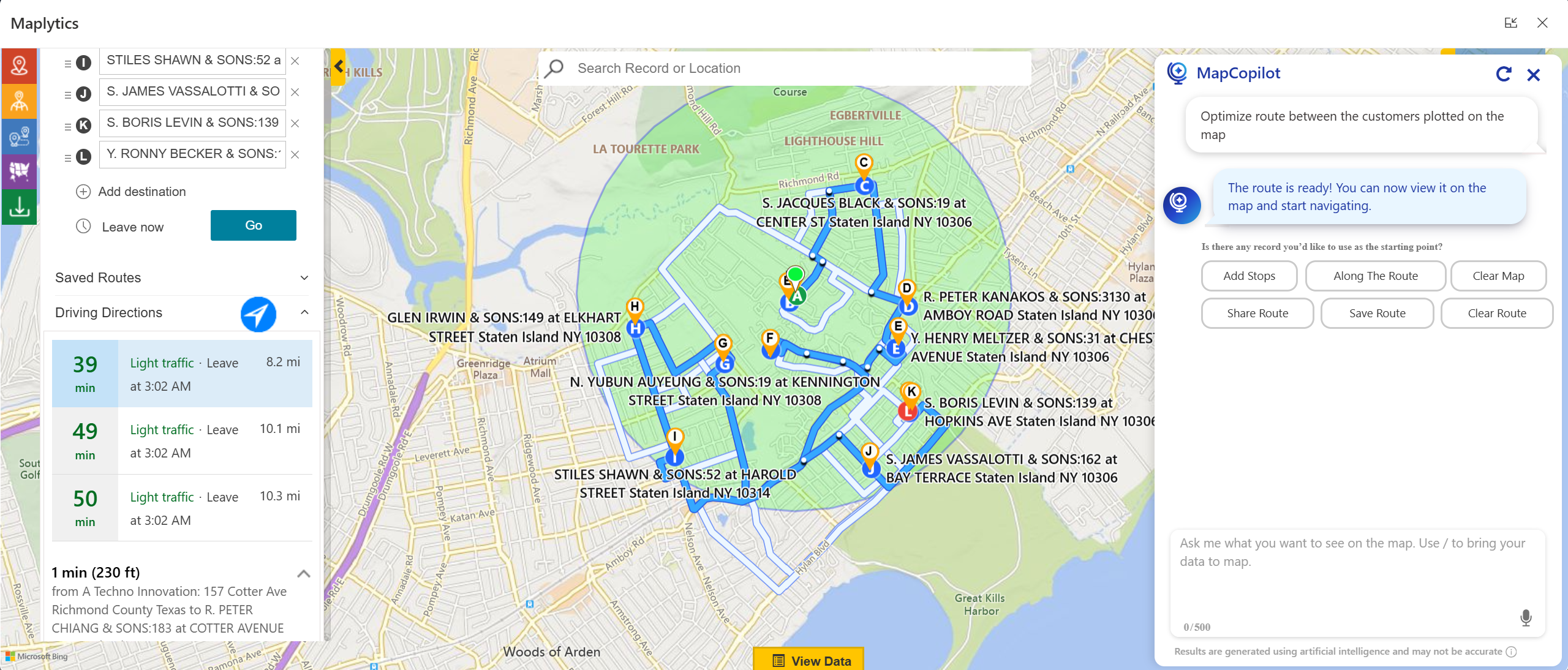
MapCopilot:
- Orders stop intelligently
- Calculates travel time and distance
- Displays routes visually on the map
This saves time, fuel, and mental effort.
3. Understanding CRM Data Visually
CRM lists don’t always show patterns clearly. Maps do.
With MapCopilot, beginners can ask:
- “Show opportunities by location.”
- “Plot accounts from Banking Industry.”

- “Highlight inactive customers on the map.”
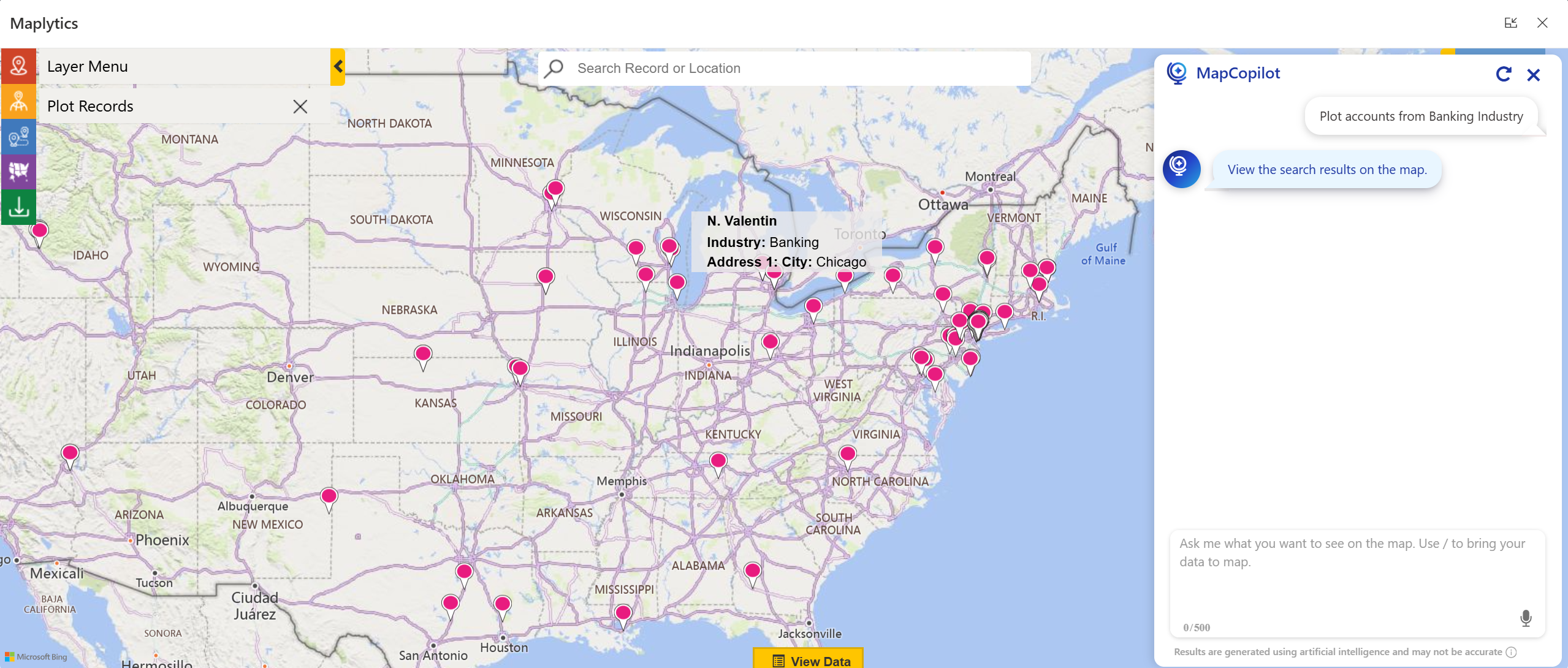
Instead of reading rows, you see patterns:
- Clusters of customers
- Gaps in coverage
- Regions with high activity
This visual clarity helps new users make better decisions faster.
4. Asking Follow-Up Questions Naturally
One of the biggest advantages of MapCopilot is that it supports conversation.
For example:
- “Show accounts near me.”
- “Now filter only active ones.”
- “Which of these have open opportunities?”
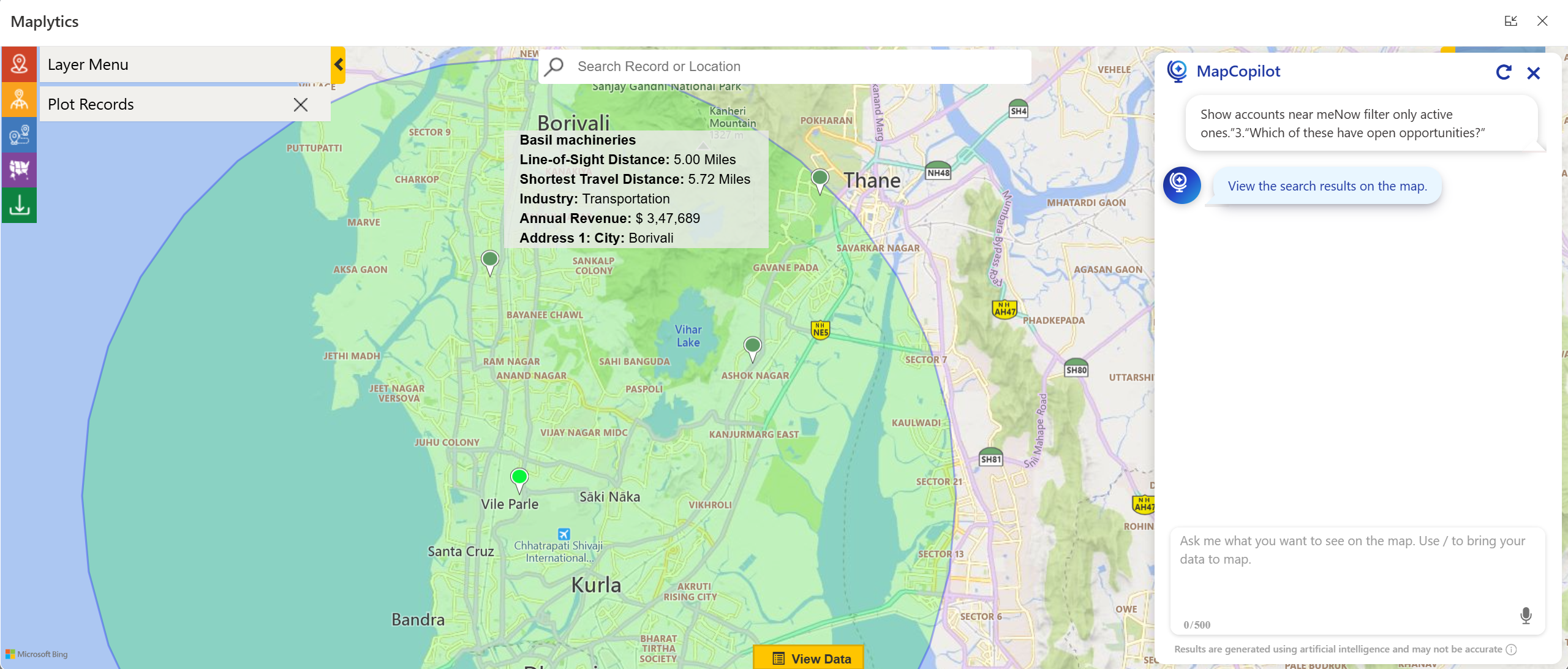 You don’t need to start over each time. MapCopilot remembers the context and builds on it.
This makes it feel less like software and more like a conversation.
5. Finding interesting places nearby
MapCopilot also helps in finding gas stations, cafes, restaurants, etc., near any location.
For instance:
- “Show hotels near me.”
- “Find gas stations nearby.”
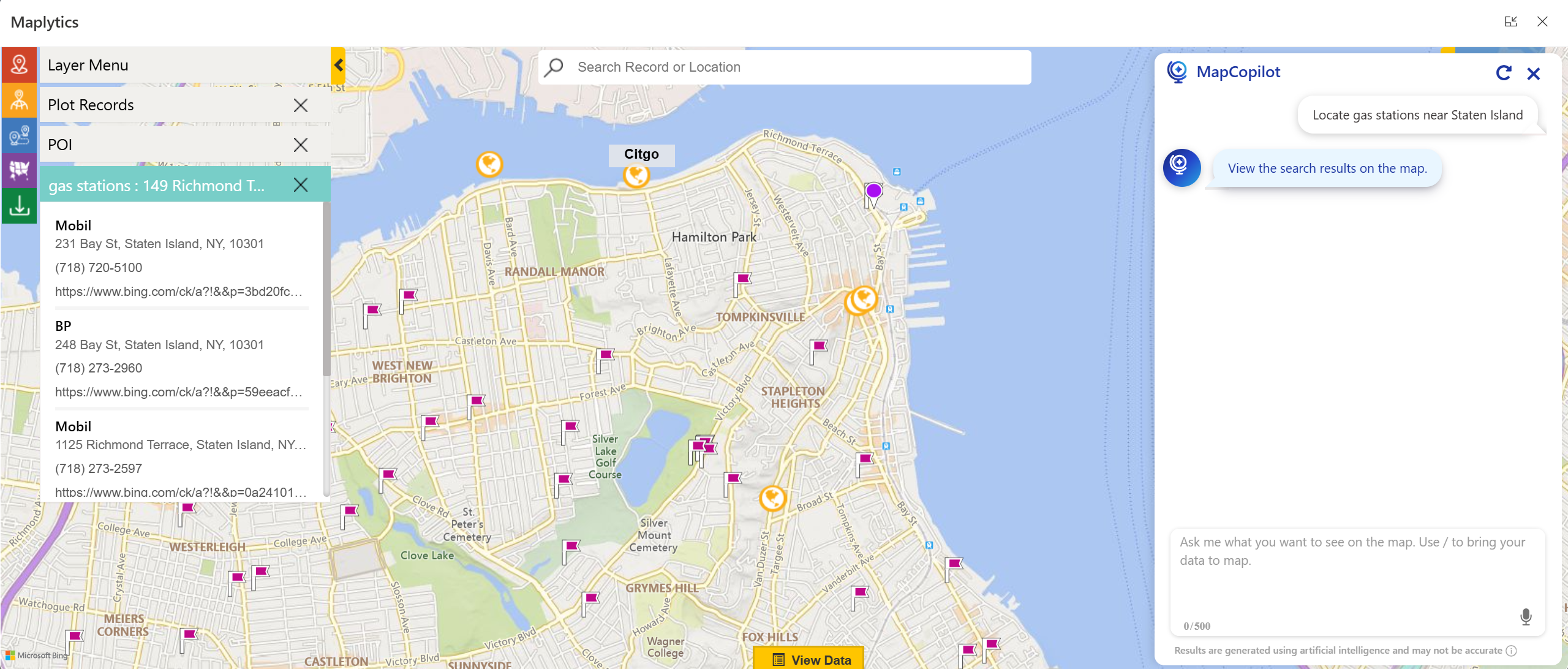 Any user can find points of interest nearby in this manner.
Do You Need Technical Knowledge to Use MapCopilot?
Short answer: No.
You don’t need to know:
- CRM customization
- Database structures
- Mapping tools
- AI configuration
MapCopilot is built to remove complexity, not add to it.
If you can type a sentence, ask a question, or read a map, you can use MapCopilot.
Who Can Benefit from MapCopilot?
Even beginners across roles benefit:
Sales Teams
- Find nearby prospects
- Plan efficient daily visits
- Discover missed opportunities
Service Teams
- Locate customers faster
- Optimize technician routes
- Respond quickly to requests
Managers
- See coverage gaps visually
- Understand territory performance
- Make location-based decisions
New CRM Users
- Learn faster
- Reduce dependency on training
- Gain confidence using the system
Why MapCopilot Is Different from Traditional CRM Search?
Traditional CRM search:
- Requires filters
- Needs field knowledge
- Takes multiple steps
MapCopilot:
- Understands natural language
- Works visually
- Delivers instant results
For beginners, this difference is huge. It lowers the learning curve and increases adoption.
Learning CRM Becomes Easier with MapCopilot
One of the biggest challenges with CRM tools is user adoption. New users often feel overwhelmed and avoid using the system fully.
MapCopilot changes this by-
- Making interactions intuitive
- Reducing fear of “doing something wrong.”
- Encouraging exploration through conversation
When users enjoy using a tool, they use it more, and that’s where real value comes from.
A Friendly Starting Point for Everyone
MapCopilot is a guide, a helper, and a translator between people and complex CRM systems.
For someone new to CRM, it removes technical barriers, learning anxiety, and time-consuming steps, and replaces them with simple questions, clear maps, and instant insights.
If you are just starting your CRM journey and want something that feels natural rather than technical, MapCopilot is the easiest place to begin.
What’s more?
Maplytics with MapCopilot is available immediately as part of the for Dynamics 365 and Dataverse. Organizations interested in adoption, 15-day free trials, or personalized demos are encouraged to contact Maplytics’ sales team at crm@inogic.com
For more information, visit our website or Microsoft Marketplace. One can hop onto the detailed Blogs, Client Testimonials, Success Stories, Industry Applications, and Video Library for a quick query resolution. Technical docs for the working of Maplytics are also available for reference.
Kindly leave us a review or write about your experience on the Microsoft Marketplace or the G2 Website.

Sam Kumar
https://www.maplytics.com/Sam Kumar is the Vice President of Marketing at Inogic, a Microsoft Gold ISV Partner renowned for its innovative apps for Dynamics 365 CRM and Power Apps. With a rich history in Dynamics 365 and Power Platform development, Sam leads a team of certified CRM developers dedicated to pioneering cutting-edge technologies with Copilot and Azure AI the latest additions. Passionate about transforming the CRM industry, Sam’s insights and leadership drive Inogic’s mission to change the “Dynamics” of CRM.