

“But Mr. Chang wanted 200 of these last week,” Sam protested. “I know, but he has changed his mind and needs only 100 now,” Kesha defended. “We have to do as the client says, Sam,” she added.
In a world where customer expectations evolve faster than business schedules, time management is the cornerstone of productivity. Whether it’s a sales rep closing deals on the road or a field technician resolving service calls, every mile, every minute, and every route matters. Yet, scheduling, one of the most fundamental processes in operations, remains one of the toughest to get right!
Manual planning eats away precious time, often leading to inefficient routes, overlapping appointments, and underutilized field resources.
The result? Increased travel costs, frustrated employees, and missed opportunities.
That’s where Auto Scheduling steps in as a strategic game-changer for modern businesses.
When combined with Microsoft Dynamics 365 and Azure Maps, Bing Maps, Google Maps, or Mapbox, Auto Scheduling becomes more than just automation. It becomes an intelligent orchestration of your entire field force.
The Rise of Automated Scheduling: Why It Matters More Than Ever
The post-pandemic shift to hybrid and mobile work has forced organizations to rethink how they plan their daily operations.
A McKinsey study shows that companies leveraging intelligent automation have improved operational efficiency by up to 30% while reducing planning time by nearly 50%.
For field teams, this transformation is even more impactful. Consider this:
- Field reps spend 40–60% of their time traveling between appointments.
- Poor scheduling can cause up to 25% idle time each day.
- Automated route and schedule planning can increase daily visit capacity by 20–30%.
With these realities in play, automation isn’t a luxury but a necessity.
Businesses need systems that think, analyze, and act without constant human intervention. And that’s exactly what Auto Scheduling in Maplytics brings to the table.
Maplytics: The Intelligence Behind Smarter Scheduling
Built to enhance Dynamics 365 with location intelligence, Maplytics by Inogic brings mapping, geo-analytics, and automation together inside your CRM.
At its core, Maplytics turns customer and business data into actionable insights on a map, visualizing territories, optimizing routes, and enabling proximity-based decisions.
But one of its most powerful capabilities is Auto Scheduling, a feature designed to automate appointment planning, route creation, and resource allocation in a way that feels almost effortless.
Think of it as your personal assistant who knows where your team needs to be, which clients to prioritize, and how to get there efficiently, while keeping your CRM data perfectly aligned.
What is Auto Scheduling in Maplytics?
Auto Scheduling in Maplytics automates the process of assigning, planning, and optimizing daily field activities.
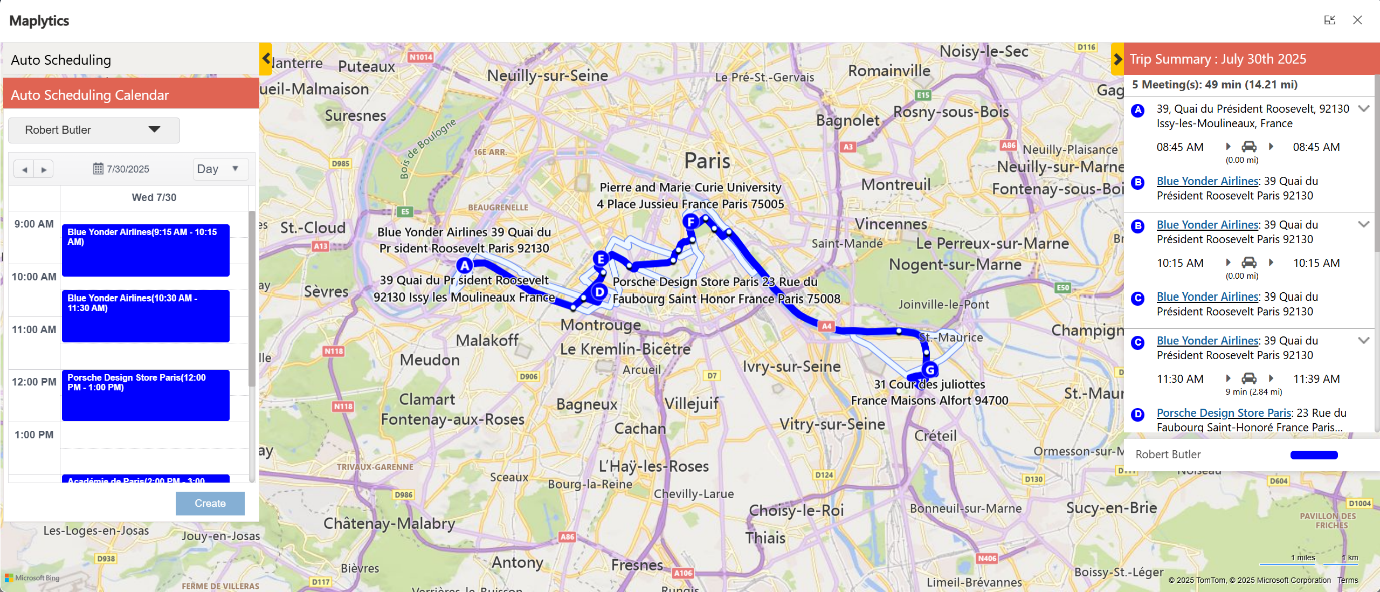
Instead of manually creating appointments or work orders for each team member, Auto Scheduling uses your Dynamics 365 data, i.e., accounts, leads, service requests, or opportunities, and intelligently assigns them based on parameters such as:
- Location proximity
- Availability and working hours
- Skills or service type
- Appointment duration
- Travel time and route efficiency
An automatically generated daily or weekly schedule for multiple field reps that maximizes productivity and minimizes travel time is generated.
How Auto Scheduling Works: Here’s a Simplified Breakdown
Here’s how Auto Scheduling transforms raw CRM data into optimized plans:
- Define Your Objectives
Start by selecting the entity you want to schedule, such as appointments, accounts, leads, or custom records in Dynamics 365. - Set Your Parameters
Configure working hours, start and end locations, meeting duration, buffer time, and the total number of meetings per day. - Let Maplytics Do the Heavy Lifting
Auto Scheduling runs advanced logic that considers distance, driving time, and automatically creates the most efficient schedule for each resource. - Visualize & Review
The generated schedule is displayed on an interactive map within Dynamics 365, allowing managers to view and adjust before finalizing. - Instantly Sync with CRM Calendar
Once approved, all appointments are synced with the Outlook calendars, ensuring complete visibility for the team.
Key Advantages of Auto Scheduling in Maplytics
- Boost Productivity and Efficiency
No more manual drag-and-drop scheduling. Auto Scheduling ensures your field team’s time is spent serving customers, not planning their day.
- Reduce Travel Time and Costs
By building optimized routes with minimal backtracking, businesses have reported up to 30% reductions in travel distance and fuel expenses.
- Data-Driven Decisions
Managers can factor in travel distance, client importance, and meeting duration, not just availability, before finalizing schedules.
- Smarter Resource Allocation
Assign the right person for the right job, factoring in skill sets, territories, and availability, ensuring balanced workloads and improved service quality.
- Real-Time Visibility
Managers can visualize every appointment, route, and field activity on a live map. If a client reschedules or cancels, the system can quickly re-optimize routes and appointments.
- Seamless Dynamics 365 Integration
Auto Scheduling is not an external tool. It’s built directly into Dynamics 365, ensuring all data flows smoothly between your CRM, map, and team calendars.
A Technical View: How Maplytics Leverages Maps
The engine behind Auto Scheduling calculates travel paths based on:
- Real-time traffic conditions
- Multiple waypoints
- Route constraints (like distance or time)
- Driving modes (car, truck, bike, etc.)
Maplytics computes the best possible path for each day’s activities while maintaining full synchronization with Dynamics 365 data models.
This tight integration ensures that Auto Scheduling isn’t just fast but also accurate, scalable, and intelligent.
For example:
- Route optimization ensures every trip is planned with minimal mileage.
- Proximity Search identifies the closest clients or service requests within a radius.
- Point of Interest (POI) search helps reps find useful stops, like gas stations, restaurants, or landmarks nearby.
Together, these features create a field management system that’s self-aware and self-optimizing.
Ease of Use: No Technical Expertise Needed
What makes Auto Scheduling in Maplytics truly stand out is its simplicity.
Field reps don’t need to remember complex commands or follow multi-step instructions. With MapCopilot, Maplytics’ conversational AI assistant, they can simply ask questions like:
- “Show me my meetings planned for today.”
- “Plan my route for these 5 accounts.”
- “Find nearby customers within 10 miles.”
And get instant, visual results inside Dynamics 365.
This natural, conversation-driven interface means any field professional, regardless of technical background, can manage their day effortlessly.
Real-World Impact: What Businesses Gain
Organizations using Maplytics’ Auto Scheduling feature have seen tangible results:
- Up to 30% increase in daily visits per rep
- 25% improvement in on-time arrivals
- Significant reduction in missed or overlapping appointments
- Enhanced transparency in team performance
Whether you’re managing a fleet of technicians, a sales force, or a distributed service team, Auto Scheduling ensures that every minute counts.
Use Cases: Where Auto Scheduling Shines
- Field Sales Teams
Plan optimal sales visits to maximize daily conversions and reduce travel fatigue. - Service and Maintenance Teams
Schedule technicians based on skill, location, and service urgency. - Healthcare and Pharma Reps
Optimize clinic visits, track coverage, and ensure compliance. - Logistics and Delivery Operations
Reduce turnaround time and fuel usage with intelligent route optimization. - Nonprofits and Outreach Programs
Manage volunteers or resources efficiently across multiple zones.
Getting Started with Auto Scheduling
Activating Auto Scheduling within Maplytics is straightforward:
- Install Maplytics in Dynamics 365
Available on the website and Microsoft AppSource - Configure Maplytics Settings
Define your working hours, distance units, and optimization preferences. - Select the Entity to Schedule For
Choose accounts, leads, opportunities, or custom entities. - Run Auto Scheduling Wizard
Let Maplytics automatically generate and visualize optimized routes and appointments. - Publish and Track
Sync results with calendars and dashboards to monitor performance.
The Future of Field Operations Is Automated
In an era where time equals money, Auto Scheduling is a competitive advantage.
By blending the power of AI, Maps, and Dynamics 365, Maplytics brings structure, intelligence, and efficiency to every business that depends on field movement. It’s not about working harder; it’s about working smarter.
So, whether you’re managing five field agents or five hundred, Auto Scheduling in Maplytics ensures everyone is in the right place, at the right time, every time. Organizations interested in adoption, 15-day free trials, or personalized demos are encouraged to contact Maplytics’ sales team at crm@inogic.com
For more information, visit our Website or Microsoft AppSource. One can hop onto the detailed Blogs, Client Testimonials, Success Stories, Industry Applications, and Video Library for a quick query resolution. Technical docs for the working of Maplytics are also available for reference.
Kindly leave us a review or write about your experience on AppSource or the G2 Website.
Frequently Asked Questions
Native Dynamics 365 scheduling manages availability and calendar conflicts, but it has no concept of geography. Auto Scheduling adds that missing layer: it factors in a rep’s actual location, travel time between stops, and real road distance when building a schedule, not just whether a time slot is free. The result is a schedule that’s geographically logical, not just calendar-logical.
Yes. Beyond proximity, Auto Scheduling can factor in resource attributes like skill sets, certifications, or role-based eligibility, so an appointment isn’t just assigned to whoever is nearest, but to whoever is both nearest and qualified for the job.
Auto Scheduling doesn’t require a full manual rebuild. It can re-evaluate the existing schedule against the new appointment’s location and insert it where it fits most efficiently, adjusting the sequence rather than forcing the rep to start planning from scratch.
It works across a team. Rather than optimizing one rep’s calendar in isolation, Auto Scheduling can distribute appointments across multiple available reps based on location and capacity, helping prevent one person from being overloaded while another sits underutilized.
No. Auto Scheduling generates a recommended, optimized schedule, but appointments are reviewed on the map before anything is finalized. Admins or dispatchers can adjust, override, or manually reassign any stop before it syncs to the calendar.
Both. Larger teams see bigger aggregate time savings simply due to volume, but even a small team benefits from removing manual, address-by-address planning each morning, the time saved per person is the same; there are just fewer people multiplying it.

Sam Kumar
marketing.inogic@gmail.comSam Kumar is the Vice President of Marketing at Inogic, a Microsoft Gold ISV Partner renowned for its innovative apps for Dynamics 365 CRM and Power Apps. With a rich history in Dynamics 365 and Power Platform development, Sam leads a team of certified CRM developers dedicated to pioneering cutting-edge technologies with Copilot and Azure AI the latest additions. Passionate about transforming the CRM industry, Sam’s insights and leadership drive Inogic’s mission to change the “Dynamics” of CRM.